欢迎您, 客户(集成方) Welcome, partner (integrator)
本篇文章的主要目的是充当目录和导航的作用, 如果您对此了如指掌,可以忽略这部分内容;或者直接去对应模块了解详细的内容!
The main purpose of this article is to serve as a directory and navigation. If you are familiar with this, you can ignore this part; or go directly to the corresponding module to learn more!
Yasee SDK 介绍 (Yasee SDK introduction)
Yasee SDK 是一款针对于支持Yasee系列产品的开发工具包,专注于Yasee支持设备的蓝牙连接和管理。是Yasee 对外开放产品的底层支持,集成了Yasee SDK, 就可以便捷的支持 功能清单 中罗列的完整检测产品以及检测项目. 通过 Yasee SDK,开发者可以轻松实现设备的蓝牙连接、绑定及管理,包括搜索设备、设备重连、以及高效的设备指令收发功能。 无论是设备的初始配置,还是后续的连接管理、数据收发,Yasee SDK 都提供了较为全面的支持,帮助开发者快速集成和控制多种蓝牙设备,并为用户提供流畅的智能设备体验。
Yasee SDK is a development toolkit for supporting Yasee products.Dedicated to Bluetooth connectivity and management for Yasee-supported devices. As the foundational support for Yasee's open ecosystem, it integrates the Yasee SDK It can easily support the complete testing products and testing items listed in Function List. English
Through the Yasee SDK, developers can easily implement Bluetooth connection, binding, and management of devices, including functions such as device searching, device reconnection, and efficient sending and receiving of device commands.
Whether it's the initial configuration of devices, subsequent connection management, or data sending and receiving, Yasee SDK provides comprehensive support, helping developers quickly integrate and control various Bluetooth devices and deliver a smooth smart device experience to users.
集成 Yasee SDK 的优势包括:The advantages of integrating Yasee SDK include:
-
快速集成:Yasee SDK 提供了简洁易用的接口,开发者可以快速集成蓝牙连接和设备管理功能,较为明显的缩短开发周期。Rapid Integration: Yasee SDK offers simple and easy-to-use interfaces, enabling developers to quickly integrate Bluetooth connection and device management functions, which significantly shortens the development cycle.
-
稳定可靠:Yasee SDK 经过测试,能够在多干扰环境下保持稳定的连接和高效的设备管理,确保用户体验的连续性和可靠性。Stable and Reliable: Yasee SDK has undergone testing and can maintain stable connections and efficient device management in environments with multiple interferences, ensuring the continuity and reliability of the user experience.
-
全面功能:SDK 支持设备的搜索、绑定、连接、重连及指令收发等功能,使得开发者无需额外编写复杂的逻辑,就能实现Yasee智能设备控制。Comprehensive Functions: The SDK supports functions such as device searching, binding, connecting, reconnecting, and sending/receiving commands, allowing developers to control Yasee smart devices without the need to write additional complex logic.
-
高兼容性:Yasee SDK 适用于Yasee 蓝牙设备的应用场景,提供了良好的兼容性和扩展性,帮助开发者应对多样化的需求。High Compatibility: Yasee SDK is suitable for application scenarios of Yasee Bluetooth devices, offering excellent compatibility and scalability to help developers meet diverse needs.
-
技术支持:集成 SDK 后,开发者可以获得专业的技术支持,快速解决开发过程中遇到的问题,确保项目顺利推进。Technical Support: After integrating the SDK, developers can receive professional technical support to quickly resolve issues encountered during the development process, ensuring the smooth progress of the project.
通过集成 Yasee SDK,开发者不仅能够大幅提高开发效率,还能提供稳定、高效的蓝牙设备管理体验,增强产品竞争力。
By integrating the Yasee SDK, developers can not only significantly improve development efficiency but also provide a stable and efficient Bluetooth device management experience, thereby enhancing product competitiveness.
快捷目录 Quick Directory
这里是快捷的访问目录,可以帮助您快速到达想去的部分
Here is a quick access directory that can help you quickly navigate to the section you want to go to.
- 直达 Direct Yasee SDK功能清单(Features List)
- 直达 DirectYasee SDK(Android)
- 直达 DirectYasee SDK(iOS)
- 直达Direct Yasee Plugin (Flutter)
Yasee SDK 功能清单 Features List
Yasee SDK 提供了广泛的设备支持和检测功能,涵盖多个健康监测设备。SDK 目前支持 TMD 设备和体脂设备,TMD 设备支持包括血压、血糖、血氧、肺功能等在内的多个检测项目,体脂设备则支持 8 电极和 4 电极的体脂测量。具体设备和检测项如下所示:
Yasee SDK provides a wide range of device support and detection functions, covering multiple health monitoring devices. The SDK currently supports TMD devices and body fat devices. TMD devices support multiple detection items including blood pressure, blood sugar, blood oxygen, lung function, etc., while body fat devices support 8-electrode and 4-electrode body fat measurements. The specific devices and detection items are as follows:
终端平台支持 Terminal platform support
- iOS (iPhone手机&平板 Mobile Phone & Tablet)
- Android (基于AOSP工程的任何终端,包括但不限于 Android手机、 定制化PDA设备等. Any terminal based on AOSP project, including but not limited to Android phones, customized PDA devices, etc. )
- Flutter (采用flutter构建UI的终端); Terminal using flutter to build UI
支持设备,包含: Supported devices include:
- TMD设备 TMD device(Y906、911、916、917)
- 体脂设备Body fat equipment (MY_SCALE、iconmon、Y900、 E263、E22017)
- 心电设备 ECG equipment (T1、T4、TA、T9、M5 等)
- 体温设备 Body temperature equipment(T20 )
- 白细胞分析Leukocyte analysis (masship)
TMD 设备支持的检测项 Test items supported by TMD devices
- 血压 blood pressure
- 尿酸 uric acid
- 血糖 blood glucose
- 血酮 Ketone
- 血氧 blood pulse
- 尿液 Urine
- 肺功能 Lung function
- 血脂 Blood lipids
- 体温 body temperature
- 荧光 Fluorescence
- C 反应蛋白Response protein
- 糖化血红蛋白 Glycated hemoglobin
- 白细胞分析Leukocyte analysis
体脂 设备支持的检测项 Body fat Test items supported by the device
- 体脂 (8电极 & 4电极) Body Fat (8-electrode & 4-electrode)
心电 设备支持的检测项 ECG Device Supported Test Items
- 静态心电检测Resting ECG test (T4、M5)
- 动态心电检测Holter monitoring (T1、TA、 T9)
- 动态体温检测 Dynamic body temperature detection (T20)
脉诊 设备支持的检测项 Detection items supported by pulse diagnosis equipment
- 脉诊检测 Pulse diagnosis detection
酒精仪 设备支持的检测项 Detection items supported by alcohol tester devices
- 酒精检测 Alcohol detection
-
呼吸酮检测 Breath ketone detection
Yasee SDK 架构设计 Architectural Design
为了更好的了解 Yasee SDK 的运行机制,可以查阅当前的架构设计,加深对Yasee SDK的理解.
To better understand the operating mechanism of the Yasee SDK, you can refer to the current architectural design to deepen your comprehension of the Yasee SDK.
红色框为无须部分(The red box indicates the unnecessary part.)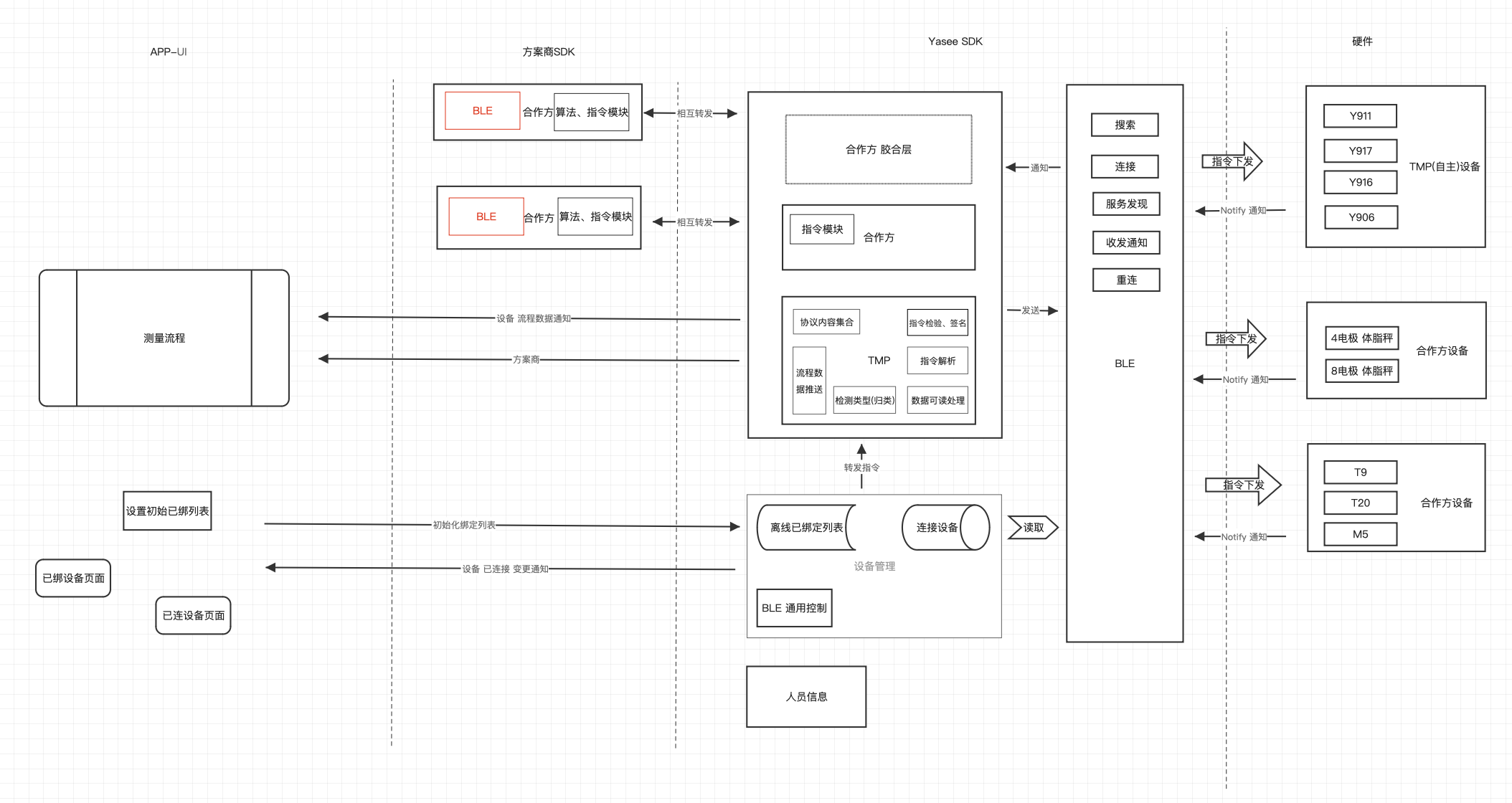
Yasee SDK 集成步骤 Integration Steps
这里简要概述Yasee SDK的集成步骤, 需要注意的是: 不管是 iOS端、还是Android端亦或Flutter端 都是一样的集成步骤,以及使用方式;接下来我将带领大家串一下集成流程:
Here is a brief overview of the integration steps for the Yasee SDK. It should be noted that the integration steps and usage methods are the same for the iOS, Android, and Flutter platforms. Next, I will walk you through the integration process:
-
明确 需要使用的集成 平台 及 平台要求 Identify the integration platform to be used and the platform requirements
- 如果您是 iOS 平台集成, 可以查阅(If you are integrating on iOS, you can refer to) iOS集成文档
- 如果您是 Android 平台集成, 可以查阅 (If you are integrating with Android platform, you can refer to) Android集成文档
- 如果您是 Flutter 平台集成, 可以查阅 (If you are integrating with the Flutter platform, you can refer to the) Flutter集成文档
-
了解 Yasee SDK 提供的功能 Learn about the features provided by Yasee SDK
-
如果您是 iOS 平台集成, 可以在此处查看Demo演示了解功能支持情况(If you are integrating with iOS platform, you can check the demo here to learn about the functional support)iOS Demo演示, 如果您是技术人员也可以查阅(If you are a technical person, you can also refer to) iOS 完整 Api 文档(iOS complete API documentation)
-
如果您是 Android 平台集成, 可以在此处查看Demo演示了解功能支持情况(If you are integrating with Android platform, you can check the demo here to learn about the supported functions)Android Demo演示(Android Demo), 如果您是技术人员也可以查阅(If you are a technical person, you can also refer to) Android Api
-
如果您是 Flutter 平台集成, 可以在此处查看Demo演示了解功能支持情况(If you are integrating with the Flutter platform, you can view the demo here to learn about the functional support)Flutter Demo,
如果您是技术人员也可以查阅(If you are a technical person, you can also refer to) Yasee Flutter Plugin Api
-
-
熟悉 Yasee 接口设计理念 以及 Api使用方式 Familiar with Yasee interface design concept and API usage
对于 Yasee SDK 接口设计来讲, 三端(iOS、Android、Flutter) 都保持一致性调用, 主要包含两个要点: For the Yasee SDK interface design, the three terminals (iOS, Android, and Flutter) all maintain consistent calls, which mainly includes two key points:
- 遵循 OOP Follow OOP
- 单一原则 SRP Single Principle SRP
比如, 如果想要知道 设备连接状态怎么办? - 找 Notify For instance, what if you want to know the device connection status? - Look for Notify
想要了解绑定列表的变化怎么办? - 找 Notify What should I do if I want to know the changes in the bound list? - Look for Notify
想要获取设备返回来的数据怎么办? - 找 Notify How can I obtain the data returned by the device? - Look for Notify.
是的 只要是想 获取变更 和 订阅变化 无论如何 SDK 内部都通过 Notify 做集中化处理和转发; Yes, no matter what, if you want to obtain changes and subscribe to changes, the SDK internally handles and forwards them all through Notify in a centralized manner.
关于更多的 Notify介绍可查阅: For more information about Notify, please refer to:
-
检验集成后的功能完备及测试工作 Verify the completeness of the integrated functions and conduct the testing work 对于 App 来讲,集成完成SDK之后 可以详细进行校验功能 和 测试. For the App, after integrating the SDK, detailed verification of functions and testing can be conducted.