集成文档 Integrated documents
导读 Guide
本篇文章展示的是Flutter的集成使用,因为 Flutter插件底层是依赖于 iOS 和 Android平台的原生代码,所以对于不同手机系统的限制条件可以去阅读 iOS使用文档 和 Android使用文档 This article demonstrates the integration usage of Flutter. Since the underlying code of the Flutter plugin is dependent on the native code of iOS and Android platforms, restrictions for different mobile operating systems can be found by reading iOS User Documentation and Android User Documentation
最后如果想更多了解Api内容 可以查阅 Yasee Flutter Plugin Api文档 Finally, if you want to know more about the Api content, you can refer to Yasee Flutter Plugin Api documentation
其次 Flutter中的Api 完全来之不同的平台原生代码,因此 如有定制化的需求可以阅读相关的原生文档! Secondly, the API in Flutter is entirely based on the native code of different platforms. Therefore, if there are any customized requirements, you can refer to the relevant native documentation!
准备工作 Preparation
准备工作的内容完全需要满足iOS 、Android端的要求.具体请查看 iOS使用文档 和 Android使用文档!! The content of the preparation work must fully meet the requirements for both iOS and Android platforms. For details, please refer to [iOS User Guide].(../yasee_ios/used_doc.md) 和 Android User Guide!!
如果想要了解更多的 flutter API 可以查阅 Yasee Flutter Plugin Api文档 If you want to learn more about the Flutter API, you can refer to Yasee Flutter Plugin Api documentation
大纲 Outline
接下来,我们将分为以下几个步骤,带领您集成、以及使用Yasee Flutter 版本插件. Next, we will proceed with the following steps to guide you through the integration and usage of the Yasee Flutter version plugin.
- 初始化 Yasee SDK
Initialize the Yasee SDK
- 蓝牙配置信息 (
BleConfig) Bluetooth configuration information (BleConfig) - 人员配置信息 (
User) Personnel allocation information(User)
- 蓝牙配置信息 (
- 数据通知相关
Data notification related
- 设备连接 通知 Device connection notification
- 设备收发信息通知 Equipment information transmission and reception notification
- 设备 绑定 变更通知 Equipment binding change notification
- 蓝牙相关操作
Bluetooth-related operations
- 搜索 Yasee 设备 Search for Yasee device
- 连接 Yasee 设备 Connect the Yasee device
- 获取 设备 支持 检测项 Obtain device support detection items
- 获取 检测项 支持的 指令 Obtain the instructions supported by the detection items
- 收发 与 外设的 双向指令 Bidirectional instructions between the device and peripheral devices
正式开始 Official start
对于一个SDK而言,👉完整的Api文档👈是必不可少的.
For an SDK,👉Complete API documentation👈It is indispensable.\
在处理异常和参数理解上有重要的意义, It is of great significance in handling exceptions and understanding parameters.
因此, SDK在使用中会有可视化的参数提示,如: Therefore, during the use of the SDK, there will be visual parameter prompts, such as:
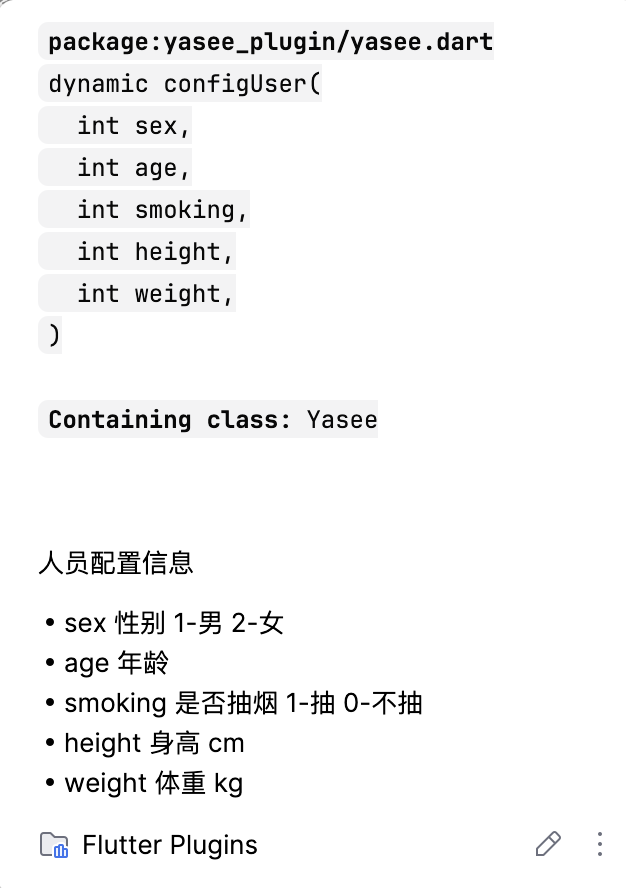
以及对每一个参数的具体说明
对于异常处理,在dart中您可以使用try..catch的方式来捕获异常: For exception handling, in Dart, you can use the try..catch structure to catch exceptions:
// 空值判断 Null value check
if (value == null) { return }

// do 异常捕获 Exception catching
try {
    // 概率下可存在 奔溃的情况
        Under certain probabilities, a collapse situation could exist.
} catch (err) {
    // 失败的逻辑处理
        Logical processing of failure
}
初始化 Yasee SDK Initialize the Yasee SDK
对于 Flutter的插件来讲,初始化的步骤已经在 内部实现了, 使用者可以无需关注插件的初始化步骤! For Flutter plugins, the initialization process has already been implemented internally. Users don't need to concern themselves with the initialization steps of the plugins!
直接使用提供的Api即可. Just use the provided API directly.
配置相关的信息 Configure the relevant information
/// 是否重连 (Boolean) | 可选默认是true
     Whether to reconnect (Boolean) | The optional default is true

/// 设置搜索自动暂停的时间 (秒级) | 可选默认是 10秒
Set the time (in seconds) for automatic search pause | The optional default is 10 seconds


Yasee.configBle(reconnect: true,scanTime: 5);


/// 设置人员信息
Set personnel information

/// 设置当前的使用人,
Set the current user.

/// 主要是为了 肺功能 和 体脂上的人员信息设置
Mainly for setting information related to lung function and body fat of the personnel.


/// User(Integer sex(1-男,2-女), Integer age, Integer smoking(1-抽,0-不), Integer height(cm), Integer weight(kg))
User(Integer sex(1-Male,2-Female), Integer age, Integer smoking(1-Smoking,0-No smoking), Integer height(cm), Integer weight(kg))

Yasee.configUser(sex, age, smoking, height, weight)
对于示例中的模型,如有理解歧义,可查看详细的注释说明: For the model in the example, if there is any ambiguity in understanding, please refer to the detailed annotation explanations:
-
详细请点击 configUser For details, please click configUser
设置当前的人员信息,主要的功能是为了 肺功能 和 体脂中的人员信息设置! 如果没有这两种检测项的测量可忽略 Set the current personnel information. The main function is to set the information related to lung function and body fat of the personnel! If there is no measurement for these two detection items, it can be ignored. :::
通知相关内容 Notification of relevant contents
所有的有关Yasee Flutter Plugin 的 通知 和 数据交互,都是通过 Stream 来处理的,包含但未来不限于: All the notifications and data interactions related to the Yasee Flutter Plugin are handled through Streams, including but not limited to:
-
设备的绑定与解绑 (
notifyBindDevices) -
Binding and unbinding of the device(
notifyBindDevices) -
设备的搜索 (
notifySearchDevices) -
Search for device (
notifySearchDevices) -
设备的蓝牙状态 (
notifyBleState) -
The Bluetooth status of the device (
notifyBleState) -
设备的通讯数据 (
notifyDeviceData) -
The communication data of the device(
notifyDeviceData)
首先我们需要了解的是通知的类型,只有了解了通知的类型才能更好的监听来自SDK的各类信息通知: First of all, what we need to understand is the type of the notification. Only by understanding the type of the notification can we better monitor all kinds of information notifications from the SDK:
/// 通知的类型
Type of notification

NotifyDevicesEntity         /// 绑定列表 & 搜索列表 Bound List & Search List
NotifyBleStateEntity        /// 设备状态 Device Status
NotifyDeviceDataEntity      /// 设备数据收发内容 Content of equipment data transmission and reception


// 获取蓝牙状态
// Obtain the Bluetooth status

Yasee.notifyBleState.listen((state)=>{

});


// 获取 绑定列表
  Obtain the binding list

Yasee.notifyBindDevices.listen((data)=>{

});

// 获取 搜索列表
Obtain the search list


Yasee.notifySearchDevices.listen((data)=>{

});

// 获取 外设 交互信息
  Obtain peripheral interaction information

Yasee.notifyDeviceData.listen((data)=>{

});
蓝牙相关操作 Bluetooth-related operations
蓝牙相关的步骤,比较固定,基本包含 搜索、连接、发送信息 The steps related to Bluetooth are relatively fixed and generally include searching, connecting, and sending information.
// 搜索蓝牙 Search for Bluetooth
Yasee.scan()

// 连接设备 Connecting device
(device as DeviceEntity).connect();

// 断开设备 Disconnect the device
(device as DeviceEntity).cancel();

//获取 设备 支持的 检测项列表
Obtain the list of detection items supported by the device

Future<List<CheckEntity>?> cheks = (device as DeviceEntity).supportChecks;

//获取 检测项 支持的 指令
Obtain the instructions supported by the detection items

Future<List<CmdEntity>?> cmds = (check as CheckEntity).cmds

// 收发 与 外设的 双向指令
Bidirectional instructions between the device and peripheral devices

try? device.send(checkId,cmdId) // 发送 接收使用 Notify 通知
try? device.send(checkId,cmdId) //Send, Receive - Use Notify for notification.
对于示例中的模型,如有理解歧义,可查看详细的注释说明: For the model in the example, if there is any ambiguity in understanding, please refer to the detailed annotation explanations:
-
详细请点击 DeviceEntity For details, please click DeviceEntity
-
详细请点击 CheckEntity For details, please click CheckEntity
设置默认的绑定列表 Set the default binding list
Yasee Flutter Plugin 支持 初始化绑定列表,并根据初始化的设备列表进行自动连接操作;首先我们需要获取一个[DeviceEntity]对象;
Yasee Flutter Plugin Support initialization of the binding list and perform the automatic connection operation based on the initialized device list; First, we need to obtain a [DeviceEntity] object;
自动连接功能取决于初始化设备的设置,由BleConfig中的reconnect字段控制,如果需要设置自动连接,需要配置此属性,默认情况不支持自动连接!! The automatic connection function depends on the settings of the initialized device and is controlled by the "reconnect" field in BleConfig. If you need to enable automatic connection, you need to configure this attribute. By default, automatic connection is not supported!!
以下为设备初始化: The following is the equipment initialization process:
/// 设备绑定列表 (需要自己维护 本地存储逻辑!!)
Device binding list (Requires manual maintenance and local storage logic!!)

static late List<dynamic> bindsObj = [];


/// 设置初始化 默认的设备,此操作可以让设备进入自动连接(前提是配置了自动连接)
 ///Set up the initial default device. This operation enables the device to enter automatic connection mode (provided that automatic connection has been configured)

Yasee.configDevices(bindsObj);
集成成功! Integration successful!
如果需要更多功能实现,可查阅 Yasee Flutter Plugin Api 文档 If you need more functionality implementation, you can refer to Yasee Flutter Plugin Api documentation